CBA hackathon · internal demo · synthetic data
Income-verified CommBank ID, straight from the Consumer Data Right
A renter scans a QR code on a rental listing. A few taps later they hold a CommBank ID that says their income clears the rent - and the agent can check that claim without ever seeing the number.
The idea
Renters prove income today by emailing payslips and bank statements to strangers. I think the Consumer Data Right can do better - the data already moves between banks under consent, it just needs somewhere safe to land and a way to share a conclusion rather than the raw statements.
So the income comes from Westpac, NAB or ANZ over CDR, with CommBank as the accredited data recipient. It lands in a CDR Data Pod - a per-customer encrypted store that runs only the programs the customer agreed to, works out income, issues zero-knowledge proofs and deletes itself when the consent ends. MATTR VII issues an mDoc "CommBank ID – Income Verified" into the ID Partners wallet SDK inside a mock CommBank app.
Every CDR participant is an authentic Ping CDR Kit participant on its own Ping stack, with its own server profiles. Nothing in the CDR leg is hand-rolled.
The journey, step by step
- Renter
Scan the listing
The QR on the listing opens
/rent/verify?listing=surry-hills-123. With the app installed, the universal link goes straight in; otherwise a fallback page offers acbaapp://button. - CommBank app
Set up CommBank ID - and tick "Also verify my income"
The usual set-up carousel, with a new toggle on page three, preselected from the QR. The app fetches the listing so it knows the rent and the income threshold.
- CommBank app
PIN, confirm PIN, review details
Unchanged from the design file below.
- PingAuthorize
Ask for an offer, get sent to consent
The app calls
POST /offers. The gateway sees no income in the customer's pod and answers 302 into CDR consent. The app opens it in a secure browser session rather than following it. - CommBank (ADR)
CDR consent at CommBank
CX-standard screens: purpose, data clusters, two use consents (verify income, generate income proofs), sharing period, deletion election, then pick a bank.
- Westpac / NAB / ANZ
Log in at the bank and pick accounts
The kit PingFederate pushes a signed request object (PAR) over mTLS. The customer enters their mobile, the demo OTP
000789, and selects accounts - joint accounts greyed out with a reason. - Ping CDR Kit
Tokens stay in the kit
The hybrid callback lands at the kit PingFederate, which swaps the code for certificate-bound tokens and stores them in the kit PingDirectory. The app gets
cbaapp://consent-complete?status=success. - PingDataSync → Redis
An event creates the pod
PingDataSync watches the kit token store and publishes
ArrangementEstablished- consent choices, no tokens - to Redis Streams. The pod runtime picks it up and creates a pod with a fresh data key. - CDR Data Pod
Load, aggregate, commit
The pod reads accounts and transactions through the kit's PingAccess, which injects the bank token. The income aggregator finds the salary stream and annualises net pay. A Poseidon commitment binds the figure. Meanwhile the app shows "Gathering your income…".
- MATTR VII
Issue the credential
Income is ready, so the gateway lets the call through. The offers API creates a MATTR offer, the wallet signs in at CBA PingFederate, and MATTR's claim source pulls identity and income. The wallet stores "CommBank ID – Income Verified".
- Agent
Prove income ≥ threshold
For a listing, the pod generates a Groth16 proof that income clears the threshold, signed over the commitment. The agent opens the link and sees "verified" - never the amount.
- CDR Data Pod
Delete in line with the CDR
When the consent is withdrawn, expires or has served its purpose, the pod deletes that compartment. With no arrangements left it destroys itself and deletes its wrapped key - a crypto-shred.
Where it starts - the CommBank ID set-up design
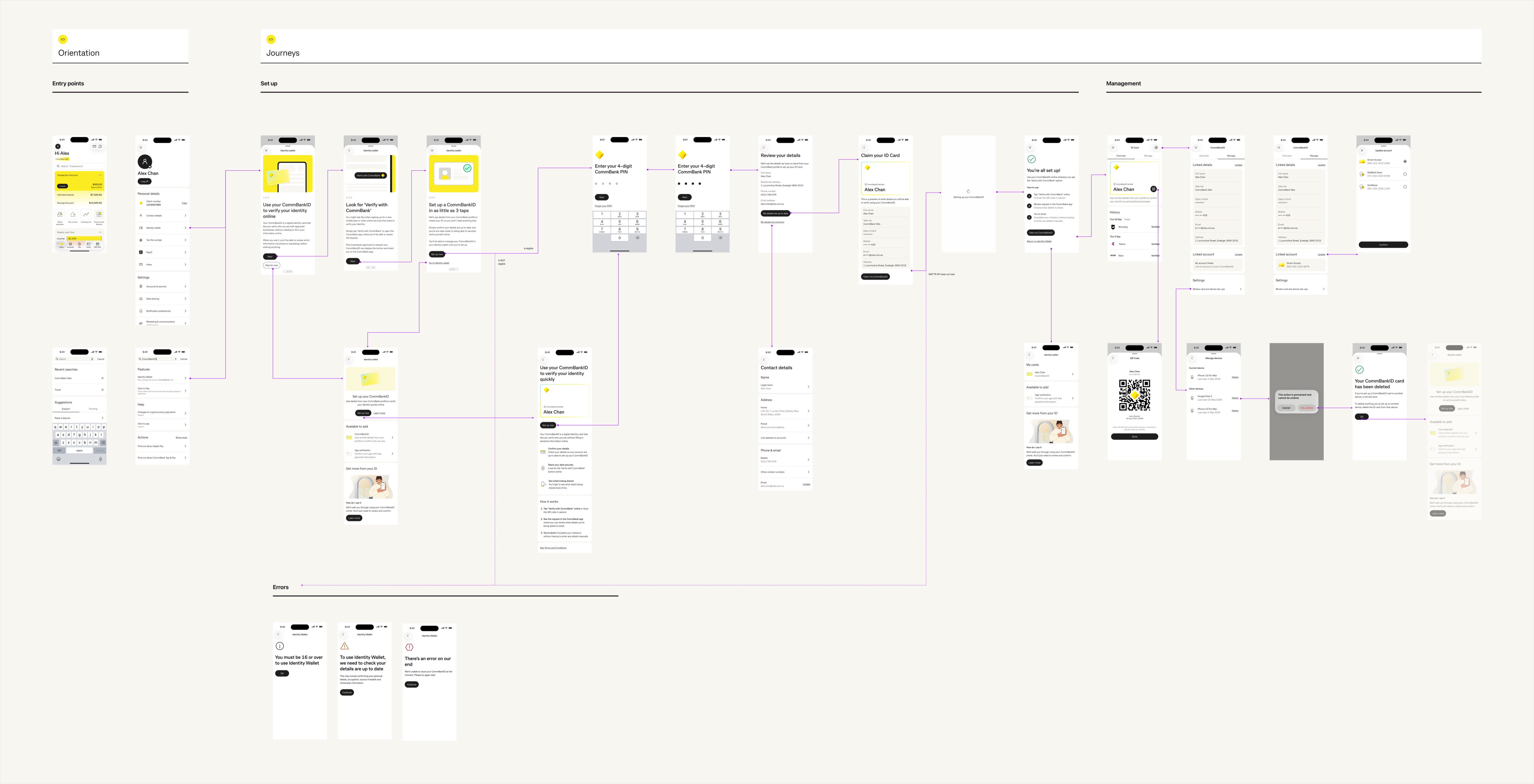
The design reference is the in-app issuance flow: intro carousel → 4-digit PIN → confirm PIN → Review your details → Claim your ID card → Setting up → You're all set. The income path slots in after Review your details: CDR consent at CommBank and the bank, a wait screen while the pod loads, then the same claim and set-up screens with the richer credential.
What's where
Mock CDR Register
CDR Register and PKI
WBCWestpac
Data holder - authentic Ping CDR Kit stack
NABNAB
Data holder - authentic Ping CDR Kit stack
ANZANZ
Data holder - authentic Ping CDR Kit stack
CBACommBank as ADR
Accredited data recipient - Ping CDR Kit data-in
ISSCommBank issuer
Offers gateway, offers API, MATTR config, QR landing
PODCDR Data Pods
Pod runtime, programs, ZK circuit and verifier
APPCommBank app (iOS)
Mock CommBank app with the ID Partners wallet SDK
Build progress
Straight from git log at build time.
75e02e7Deploy the PingAuthorize offers gateway to Railway; offers-api /offers is gateway-only7b6542aiOS: default to the Railway environment so device builds work off-network1fbd106iOS: log on through CBA PingFederate (auth code + PKCE) when CBA_PF_URL is set; Railway uses cba-pf57f1f76Set Apple team JH6RX4DRG2 for the iOS app and universal links7a52b89Deploy pod-runtime, zk-verifier, qr-landing and Redis to Railway; point iOS at Railway services720b20dSet up the hackathon1 MATTR tenant and deploy CBA PF and offers-api to Railway095e2b6Initial hackathon build - CDR income verification via Ping CDR Kit and data pods